
Datum Atlas
Choose the right material: property charts, selection and referenced data, in one app for Windows.
For Design and materials engineers, and students.
What Datum Atlas is
Datum Atlas helps you pick a material and show why it is the right one. Choose a design goal, such as a light, stiff beam or a cheap, strong tie, and Atlas sets the property chart, the selection line and the limits for you.
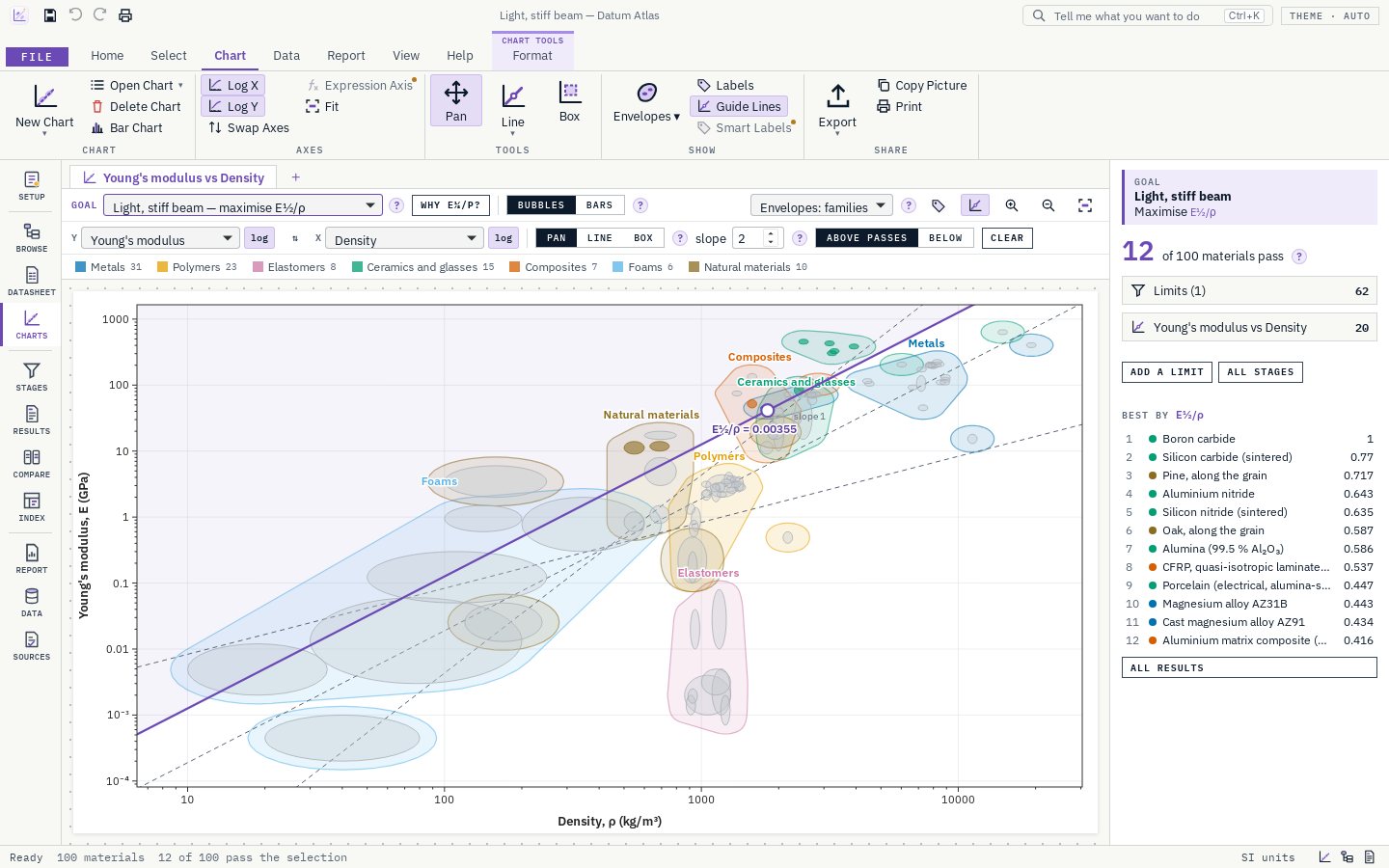
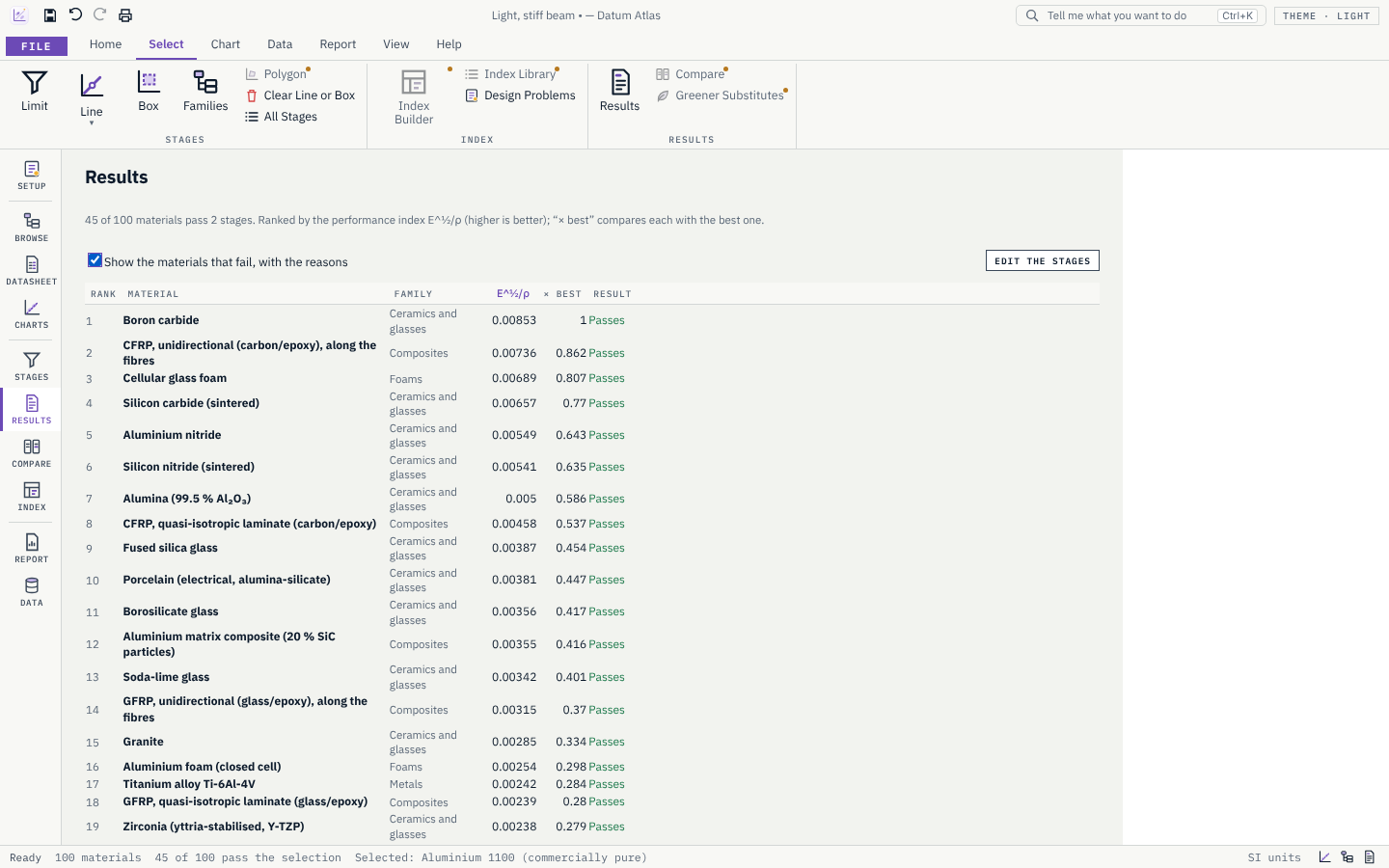
Every material is a bubble spanning its range of values, grouped by family. Limits, index lines, bands, boxes, drawn shapes and whole families left out narrow the field; the materials that pass are ranked, by one index or by weighted properties, and every one that fails says why. Compare the best side by side and print a report. Every value names its source, and you can add, import and share your own materials.
- Step 1
Pick a goal
Choose a design goal, or set the two properties to chart yourself.
- Step 2
Chart and select
Move the selection line, add limits and boxes, and watch the field narrow.
- Step 3
Rank, compare and report
See the materials that pass, ranked. Compare the best side by side, then print the selection report or send the results to a spreadsheet.
What it does
- A
About 250 materials from every family, compiled from open and public sources. Every value names its source; 73 values are checked against published datasheets so far, and gaps stay gaps, never zero.
- B
Property charts of any two properties or of your own formulas, with family envelopes, zoom, pan, the best materials labelled and labels kept apart; bar charts; up to four charts side by side.
- C
25 design goals and a library of 47 performance indices, with an index builder; a goal sets the axes, the selection line and the limits in one pick, and explains why.
- D
Selection by limits, index lines, bands, boxes, drawn shapes and families; results ranked by an index or by weighted properties, with the reason every other material fails.
- E
Compare up to six materials in a table and a radar chart, and print a selection report with the charts, the shortlist and the datasheets.
- F
Your own materials and formula properties; import from a spreadsheet or CSV, open a colleague's database, and export results and materials to a spreadsheet. SI or imperial units everywhere.
Screens
Roadmap
- Nextv0.3.0
Eco and process
- Energy and CO₂ across a product's life, and greener substitutes.
- Choose manufacturing processes alongside materials.
- Goalv1.0.0
Stable
- About 1,000 materials, a user guide and a signed installer.
Releases
v0.2.1The publisher name for the whole Datum family.
Windows
- Windows now lists the publisher as Datum.
v0.2.0The big update: sturdier files, several selections and weighted ranking, a library of performance indices and your own formulas, compare and a selection report, about 250 materials, and your own databases with spreadsheet import.
Sturdier
- A damaged or unusual project, database or spreadsheet gives a clear message and never crashes the app. A damaged “My materials” file is kept aside under a new name, never emptied.
- Files are written safely: a save that is cut off leaves the old file whole.
- Over a thousand random and broken inputs are tried by the tests on every change, and the build checks the licences of everything the app is made from.
Selection
- Several selection lines on one chart, and bands: two facing lines with the materials between them.
- Draw a shape around the materials you want, besides lines and boxes.
- Goals that need two charts, such as stiff and strong, set up both.
- Set a line to pass through an index value you type, and nudge the active line with the arrow keys.
- Rank by weighted properties instead of one index: each property scaled from worst to best, with your weights.
Indices and formulas
- 25 design goals and a library of 47 performance indices, each with its function, constraint, objective and free variable. Plot any of them in one click.
- Build an index from properties and powers; the chart and the line follow.
- Formula axes and your own formula properties, such as σy/ρ: calculated for every material with its range, usable in charts, limits and tables. Gaps stay gaps.
Charts
- Up to four charts side by side, with the hovered material shown on all of them.
- The best materials labelled, and labels placed so they do not overlap, with leader lines; drag a label to move it.
- Chart styles: classic, publication and mono (greys, for black-and-white print).
Compare and report
- Compare up to six materials in a table, with the highest and lowest of each property marked, and in a radar chart.
- A selection report: requirements, design goal, stages, charts, shortlist, comparison and the candidates' datasheets with their sources, ready to print or save as PDF.
- Results to a spreadsheet (.xlsx) or CSV.
Data
- 252 materials (105 metals, 53 polymers, 16 elastomers, 30 ceramics and glasses, 15 composites, 12 foams, 21 natural materials), compiled from open and public sources only: government handbooks, open datasets, university notes, producers' datasheets and typical textbook ranges. The tests refuse any source that is not open or public.
- Durability ratings for every material: water, acids, alkalis, sunlight and fire resistance. Fatigue strength and electrical resistivity for the metals.
- 73 values now checked against published datasheets (✓). The other values remain drafts.
Your own data
- Import materials from a spreadsheet or CSV: the app guesses what each column holds, reads ranges and imperial units, and shows the rows before adding them.
- Open a colleague's database beside the built-in data; its materials are marked with its name and can be closed again.
- Save your own materials as a database to share, a spreadsheet or CSV.
Help
- Help › Roadmap shows what each coming release brings. New ? cards for selections, ranking, formulas, indices, compare, report, import and databases, and new terms in the Glossary.
v0.1.1Design goals that set up the chart, the line and the limits in one pick; SI or imperial units; bar charts; a Sources page; ? help beside the tools; and the first values checked against published datasheets.
Design goals
- A Goal list above the chart with 22 goals, grouped: minimum mass (stiff or strong tie, beam and panel; column; stiff shaft), minimum cost and minimum carbon (tie, beam, panel), elastic design (spring, elastic hinge), damage tolerance (yield before fracture, leak before break, tough and light), and thermal (precision parts, insulation, heat sinks, thermal shock).
- A goal sets the axes, draws the selection line of the right slope through the best materials (the top fifth pass), adds the limits it needs, and ranks the results by its index. Its limits are marked “from the goal” in Stages; change or remove them freely. Your own limits are never touched. “Explore” removes the goal's line and limits.
- “Why E½/ρ?” explains each goal: the function, the constraint, the objective, the free variable, and how the index follows.
- Setup lists the goals too, and Tell Me (Ctrl+K) finds them.
Values and units
- Derived properties, calculated from each material's own values: price, CO₂ and energy per volume, specific stiffness and strength, thermal diffusivity and thermal shock resistance. They work as chart axes and in limits.
- SI or imperial units everywhere: chart axes, tables, datasheets and limits (Options, or the status bar). Values are stored in SI, so switching loses nothing.
- Index names are written as they are printed: E½/ρ, E⅓/ρ, σy⅔/ρ.
Charts
- Bar charts: one property for every material, a bar from its low to its high value, grouped by family and sorted.
- Copy the chart as a picture, ready to paste into a report.
- Family labels move apart when they would overlap; the index value sits where the line is clear.
- The chart toolbar is in two rows so it fits on smaller screens.
Data and sources
- Home: Material Library, Add a material, Sources and Roadmap tiles.
- A Sources page: every source, its kind and licence, and a click shows which materials and values cite it. Open and public sources only.
- 51 values in 15 metals are now checked against published datasheets from producers and suppliers (aluminium 2024, 5083, 6061, 7075 and A356; steels 1045 and 4340; 17-4PH; ductile iron; copper, brass and copper-nickel; titanium grades 2 and 5; nickel alloy 718). Each checked value cites its datasheet, with a link, and shows ✓ on the datasheet. Where a datasheet was outside our range the range was widened (4340 elongation, A356 strength and elongation, brass density and conductivity, copper-nickel yield strength, 5083 conductivity, 17-4PH tensile strength). The other values remain drafts.
Help
- A small ? beside the tools (goal, chart tools, slope, envelopes, bars, stages, limits, results, browse, datasheet, sources, units and more): a click says what the tool is for and how to use it. Help › What Is This Tool? lists them all.
- Tell Me also finds materials by name, UNS or EN number and opens their datasheet.
v0.1.0The first Datum Atlas: about 100 referenced materials, property charts with family envelopes, and selection with limits and index lines.
Materials
- About 100 generic materials from every family: metals, polymers, elastomers, ceramics and glasses, composites, foams and natural materials.
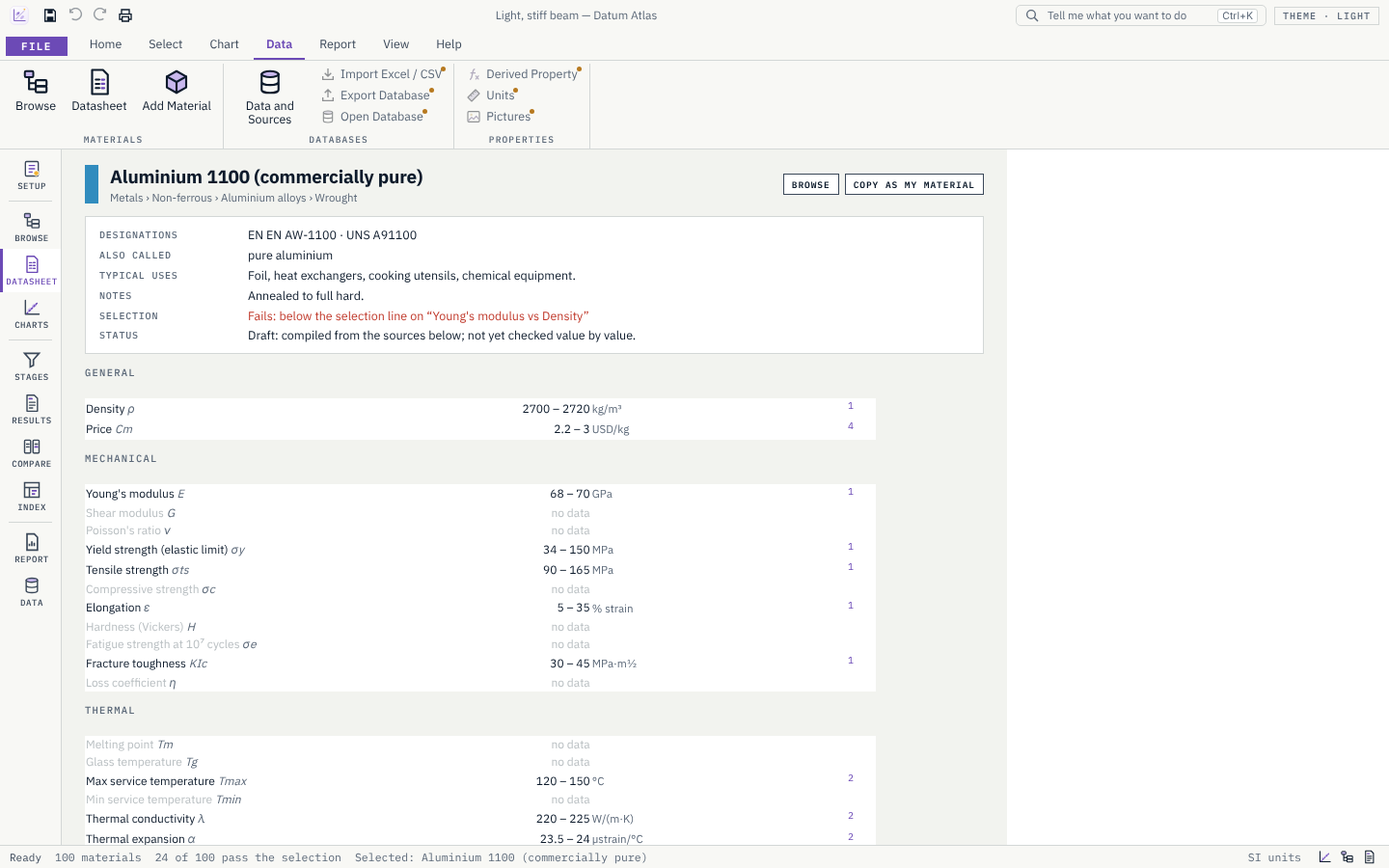
- Each value is a range with its source. The datasheet numbers the references and lists them at the bottom.
- Built-in values are drafts: compiled from the named sources, not yet checked against each table or page.
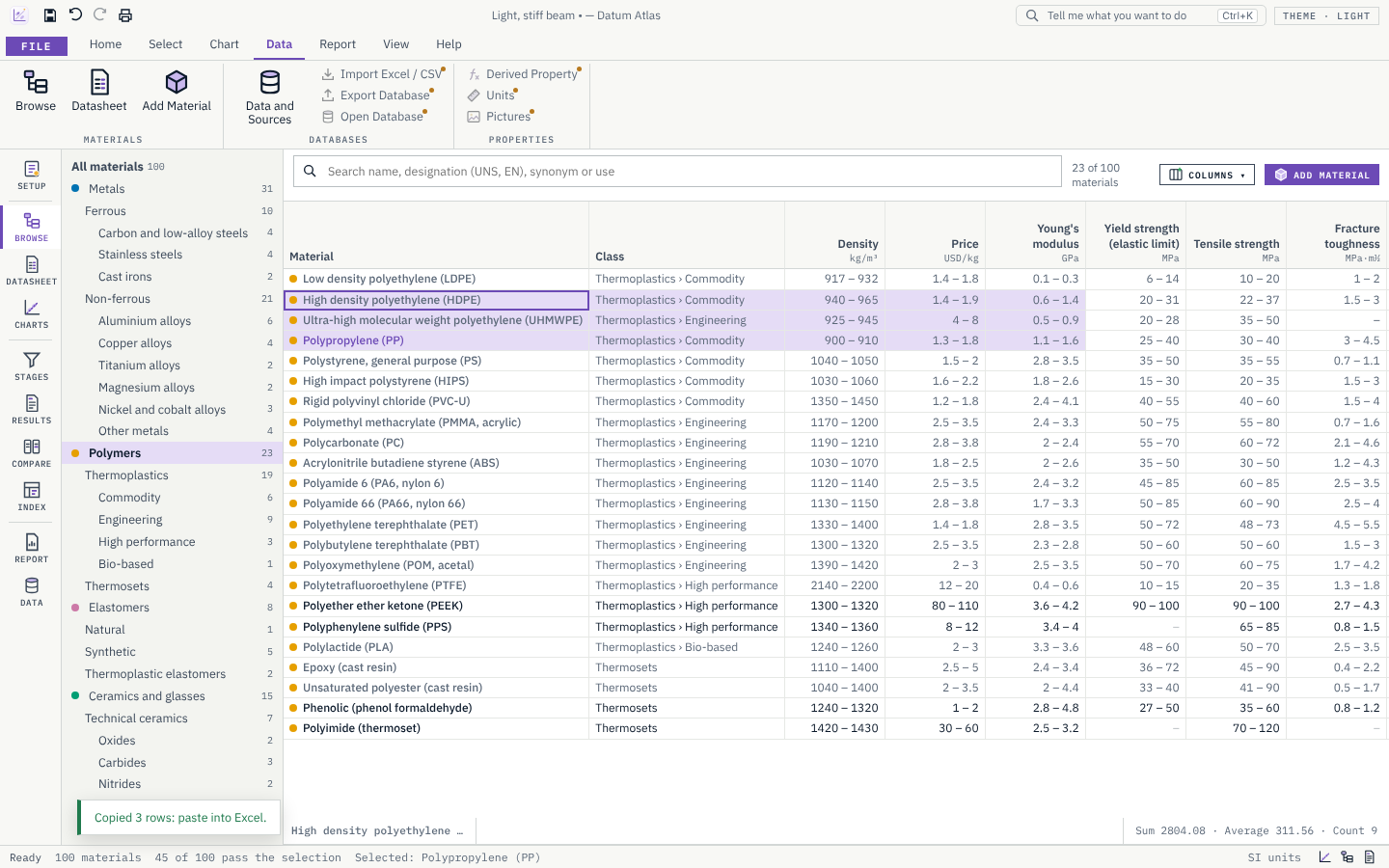
- Browse: a family tree and a table you can sort, select and copy to a spreadsheet (Ctrl+C), with Sum, Average and Count.
Your own materials
- Add Material explains what is needed: a name, the family, density, at least one more property, low and high values in the unit shown, and where the values come from.
- Your materials are saved on this computer and appear in Browse, the datasheets, every chart and the selection. Edit or delete them, or copy a built-in material and change it.
Property charts
- Any two properties on log or linear axes. Each material is an ellipse spanning its ranges; each family has a smooth envelope (one per group where a family is spread out).
- Hover for the ranges, click for a short datasheet beside the chart, double-click for the full one.
- Wheel to zoom, drag to pan, Fit; guide lines of slope 1, 2 and 3; click a family in the legend to hide it.
- Export as SVG or PNG; print or save as PDF.
Selection
- Limits: minimum and maximum values and yes/no properties. Materials without the value fail with a reason, or can be kept and marked.
- Selection line: place it with the Line tool, drag it, type its slope; the materials above it pass. The chart shows the index and its value at the line, such as E^½/ρ = 0.00316.
- Selection box, and families or classes left out.
- Results: what passes, ranked by the index with “× best”, and why every other material fails. The stage panel beside the chart shows the counts and the best materials.
Getting started
- File › Home: design problems to start from (light stiff beam, strong tie, stiff panel, springs, hot and light, damage tolerant).
- Setup for the requirements; Getting Started explains the method; the Glossary explains every term.
- Every planned feature already has its place in the ribbon and the sidebar; Help › Roadmap says when it arrives.
Get Datum Atlas.
Free and open source (MIT). Installs in seconds for your user account, with no administrator rights, and updates itself from inside the app.