
Datum Sim
Model and simulate dynamic systems: block diagrams, control and motors.
For Control, mechanical, electrical, process and mechatronics engineers, researchers and students.
What Datum Sim is
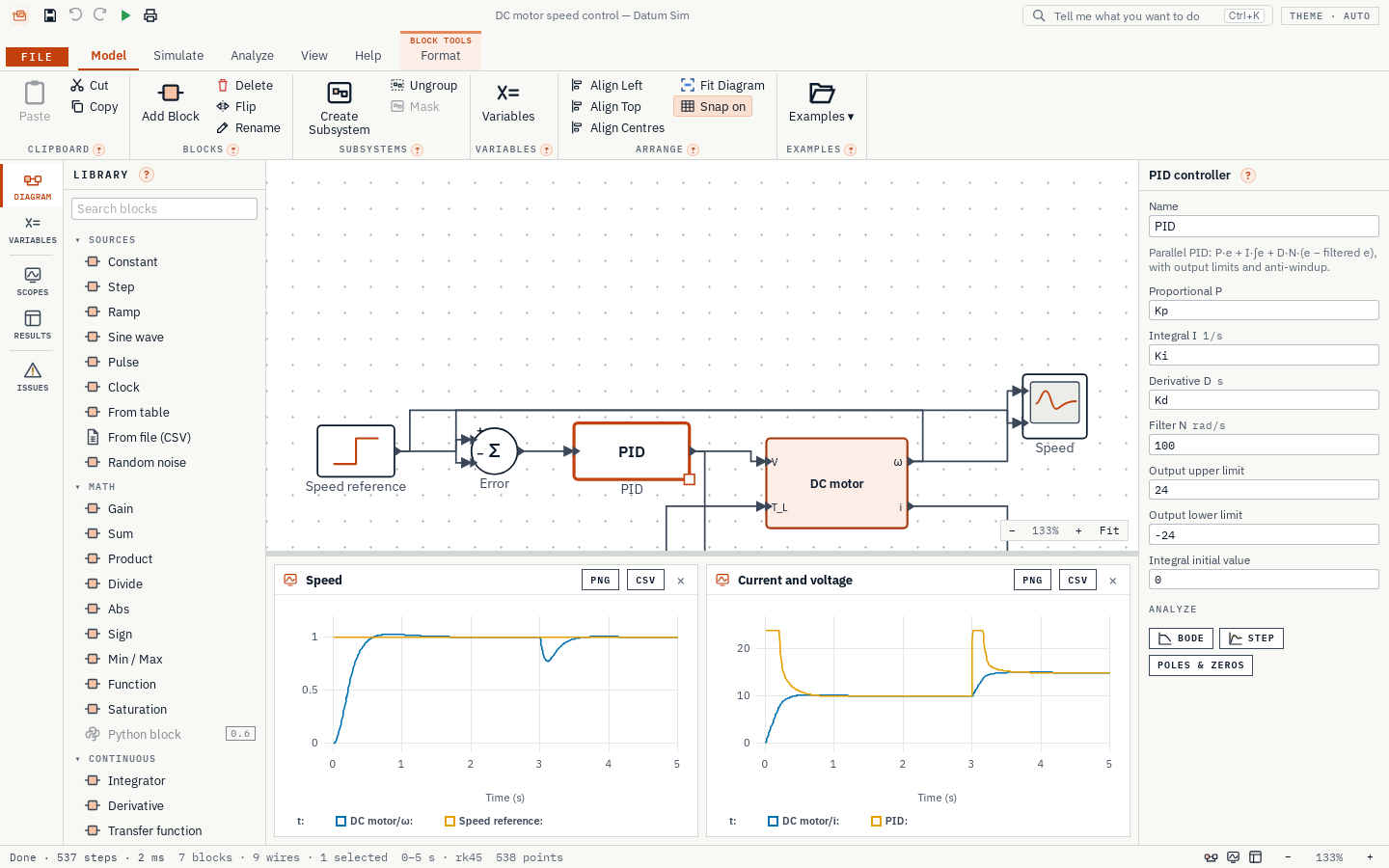
Datum Sim models and simulates dynamic systems. You draw the system as blocks and wires: sources, transfer functions, state space, continuous and discrete PID controllers, lookup tables, and a motor library with DC, induction, synchronous, switched reluctance, BLDC and stepper motors, inverters and transforms. Group blocks into subsystems, give them parameters of their own with a mask, and keep them in your own library. Then press Run and watch the signals on live scopes.
Five solvers cover everything from simple fixed-step runs to stiff systems; the variable-step solvers find switching times exactly. Discrete controllers run at their own sample times, and the diagram can colour every block by its rate. Motors come with typical values for low, medium and high voltage ratings. Scopes have measuring cursors, step-response marks and comparison of earlier runs, and a probe reads any wire after a run. Parameter sweeps run in the app's own engine, step-response specifications and Bode plots come from a built-in Python engine, and the solvers, main blocks and motors are checked against known answers.
- Step 1
Draw the model
Drag blocks, motors and your own saved blocks from the library, wire them together and set their parameters, or pick a typical rating. Name signals, add notes and colour the blocks.
- Step 2
Run
Choose a solver and a stop time, press Run and watch the scopes live.
- Step 3
Analyse and tune
Measure with cursors and step-response marks, compare runs, read any wire with the probe, and sweep parameters to tune the controller.
What it does
- A
Draw a model as blocks and wires, press Run and watch live scopes
- B
Scopes with two measuring cursors, step-response marks, comparison of the last five runs, stacked plots, and PNG or SVG pictures
- C
A signal probe: hover any wire after a run to read its value
- D
Wires that route themselves: move segments, branch from a wire, name signals; notes, block colours and Find on the diagram
- E
84 blocks: sources, math, transfer functions, state space, PID, delays, discontinuities, lookup tables, discrete control, motors and drives
- F
Discrete control: discrete transfer function, state space, integrator and PID, rate transition, and sample-time colours on the diagram
- G
Motor library: DC (separately excited, shunt, series, compound), induction (squirrel-cage, double-cage, wound-rotor), synchronous (permanent-magnet, reluctance, wound-field with dampers), switched reluctance, BLDC and stepper
- H
Typical ratings for low, medium and high voltage motors, filled in with one choice
- I
Drives: three-phase source, inverter (average or switched), DC link, PWM, Clarke and Park transforms, encoder, current sensor
- J
Subsystems with masks (parameters of their own, help and typical ratings), My blocks for your own library, and Goto/From tags to send signals without wires
- K
Five solvers, from fixed-step Euler to variable-step and stiff; the variable-step solvers find switching times exactly
- L
Parameter sweeps, plus step-response specifications and Bode plots from the built-in Python engine
- M
The solvers, main blocks and motors checked against known answers, including power balance for the induction, synchronous, DC and BLDC motors
Screens
Roadmap
- Nextv0.3
Control design
- Operating points and linearisation of whole models
- Nyquist and root locus
- PID auto-tuning
- Live tuning while the model runs
- Buses
- Solving algebraic loops
- Laterv0.4
Physical components
- Mechanical, rotational, electrical, hydraulic and thermal components you connect by ports
- Laterv0.5
Exchange
- FMU import and export (FMI standard)
- Modelica models through an external compiler
- Laterv0.6
Studies
- State machines
- Python blocks
- Monte Carlo and sensitivity analysis
- Fitting model parameters to measured data
- Goalv1.0
Validated
- Validation suite and report
- User guide
- Signed installer
Releases
v0.2.0Reusable models: masks and My blocks.
Masks
- Give a subsystem a mask (Model › Mask, or the Inspector): parameters of its own with labels, units and defaults, a text on the block, its own help card, and typical ratings saved from the block's values.
- The blocks inside use the parameters by name; a parameter's value can use the model's variables and the parameters of masks around it. A masked subsystem is set in the Inspector like any block, and errors point at it.
- Look under the mask (right-click or the Inspector) to see and change the blocks inside.
My blocks
- Save any subsystem to My blocks; it appears at the top of the Library for every model. Drag it in or double-click it: each model gets its own copy, so changing a saved block later never changes models that already use it.
- Options › My blocks chooses the folder, so a team can share one on a network drive.
Worked example: a masked DC motor block used for two different motors in one model.
Files: models are saved in file format 2 (it can hold masks). Files from earlier versions open as before.
v0.1.6Wires and the diagram: easier to draw, read and find your way in.
Wires
- Drag a wire's middle segment sideways to move it; the bends stay square.
- Alt-drag (or Ctrl-drag) from a wire to branch its signal to another input.
- Double-click a bend to remove it.
- Signal names: double-click a wire (or use the Inspector) to name the signal it carries. The name shows on the wire, on the printed diagram and in scope legends and results, and every wire from the same output carries it.
Diagram
- Notes: text notes on the diagram for explanations, reviews and teaching (Format › Note). Wires run over them and they are printed with the diagram.
- Find (Ctrl+F): find a block, or a named signal, anywhere in the model, inside subsystems too; choosing one opens its diagram and selects it.
- Block colours: colour blocks to mark the plant, the controller and the sensors (Format › Block Colour, or right-click).
- Distribute: space three or more blocks evenly, across or down.
v0.1.5Scopes you can measure with, and a probe that reads any wire.
Scopes
- Cursors: two lines, A and B, that you drag across the plot; a table gives every signal at A and at B, the difference, Δt and 1/Δt.
- Marks: rise time (10–90 %), overshoot, peak and settling time (2 %) of the first signal, drawn on the plot.
- Compare runs: the last five runs are kept; overlay any of them, dashed in the same colours.
- Axes: drag up or down to zoom the y axis; a fixed y range; one plot per input (stacked) on a shared time axis. Layout and range are saved in the Scope block.
- Pictures: PNG as shown, PNG at three times the size for print, and SVG for papers and reports.
Signal probe
- Simulate › Log all signals logs every signal of the model. After the run, hover any wire to read its value at cursor A (or at the end of the run), inside subsystems too.
Fixed
- With every signal logged, the first run no longer opens an empty scope.
v0.1.4Discrete control: controllers that run at a sample time, as in a microcontroller, and more motor and drive blocks.
Discrete control
- Discrete transfer function and discrete state space.
- Discrete integrator (forward Euler, backward Euler or trapezoidal) with limits and a reset input.
- Discrete PID with a filtered derivative, output limits and anti-windup (clamping or back-calculation).
- Rate transition, to pass a signal between sample times (hold, or a one-sample delay).
- Sample-time colours (View › Sample-time colours): every block is coloured by how often its output changes, with a legend: continuous, each sample time, constant, or several rates.
Blocks
- A reset input on the Integrator (rising, falling or either edge), located exactly.
- Goto and From: send a signal by name without a wire, within one diagram or across the whole model.
- Sources: square wave, triangle wave, chirp (frequency sweep), repeating sequence.
- Terminator, to end an output you do not need.
Motors and drives
- Switched reluctance motor (6/4, 12/8 …) with an asymmetric bridge, and typical ratings.
- DC link (with a diode rectifier that only charges it), inverter DC current, and a current sensor with gain, offset, bandwidth and noise.
Worked examples: a digital PMSM drive (10 kHz current loop, 1 kHz speed loop) whose DC link rises while the motor brakes; a DC motor with a digital and a continuous PID side by side; switched reluctance motor speed control.
Checked: the discrete blocks against their difference equations; power balance for the induction, synchronous, DC and BLDC machines; the switched reluctance motor's torque and energy balance. See the verification record.
Fixed
- A signal resting at exactly zero (such as a reset input between pulses) could make the variable-step solvers take endless tiny steps.
v0.1.3Windows now lists the publisher as Datum.
- Windows now lists the publisher as Datum.
Get Datum Sim.
Free and open source (MIT). Installs in seconds for your user account, with no administrator rights, and updates itself from inside the app.