
Datum Calc
Engineering calculations with real units, as readable maths, with checks and a printable calc sheet.
For Mechanical, process, structural and electrical engineers, students and lecturers: everyone who writes calculations.
What Datum Calc is
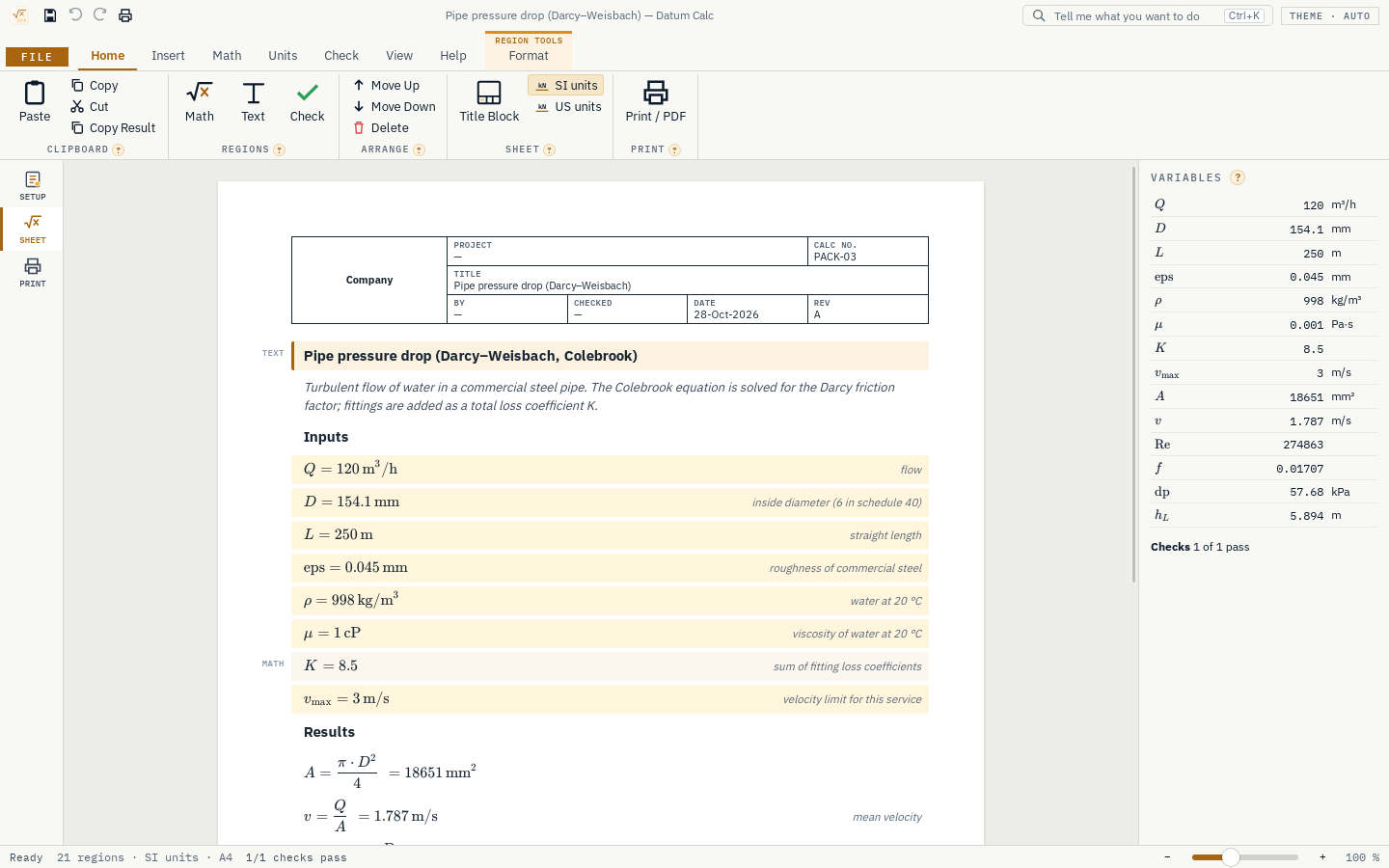
Datum Calc is a desktop app for engineering calculation sheets. You type equations with their units, such as Q = 120 m^3/h or P = rho*g*Q*H/eta; Datum Calc shows them as readable maths, works out each answer with its unit, and catches mistakes such as adding metres to seconds on the line where they happen.
Checks compare results with their limits and show PASS or FAIL with the utilisation. The sheet prints as a clean, referenced calc sheet with a title block (project, calc number, by, checked, date, revision) and page numbers, ready to hand in. Ready-made calc packs for pumps, pipes, compressors, heat exchangers, tanks, pipe walls, vessels, beams, columns, shafts, bolts, thermal expansion, motors, cables and AC circuits start you off. Complex numbers (3 + 4j) work out AC circuits, shown as 3 + 4j or as magnitude and angle.
- Step 1
Write the equations
Type each equation with its units, top to bottom, as on paper; the maths is shown as you would write it.
- Step 2
Check the results
Every answer carries its unit; checks against your limits show PASS or FAIL with the utilisation ratio.
- Step 3
Print the calc sheet
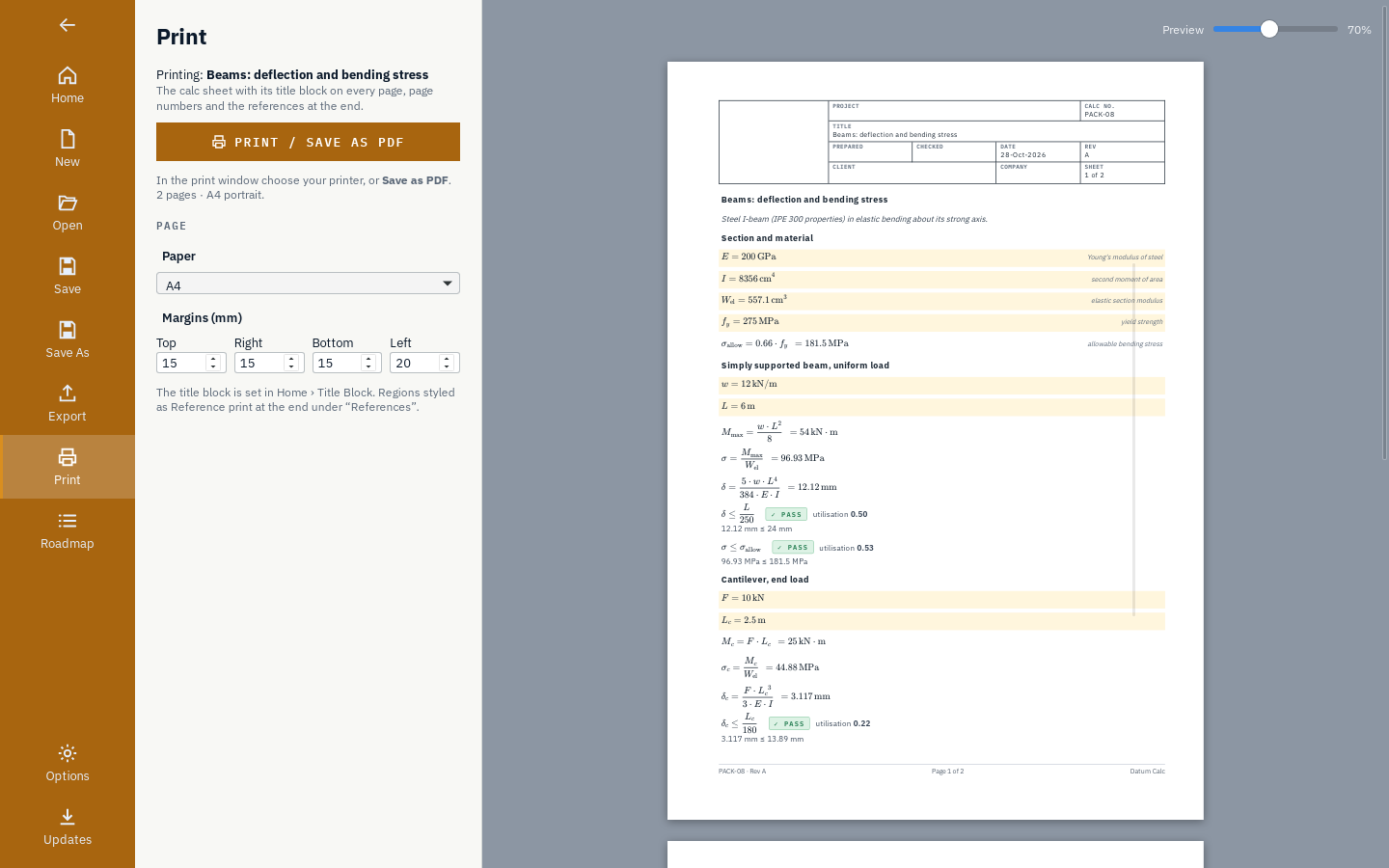
Fill in the title block and print or save a PDF with page numbers and references.
What it does
- A
Equations with real units: about 200 units, SI with prefixes and US customary, absolute and difference temperatures, torques in N·m, dimension errors caught on the line.
- B
Readable maths: what is shown is drawn from the same expression the engine computes.
- C
Checks with PASS or FAIL and the utilisation ratio.
- D
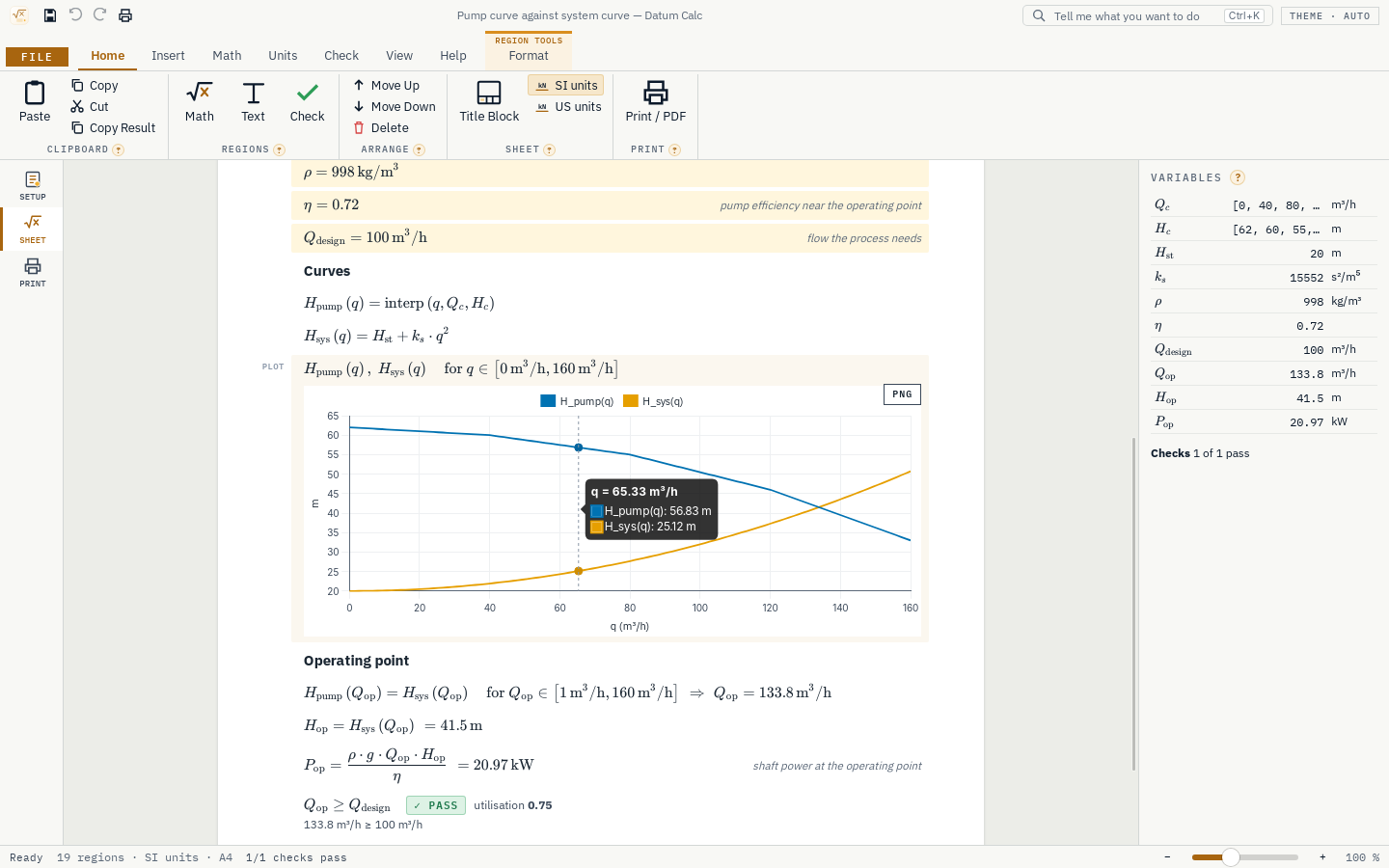
Solve for the value that makes an equation zero within a range, plot functions such as a pump curve against the system curve, and tables with units per column.
- E
Seventeen ready calc packs, each with its reference and a test against a worked example.
- F
Complex numbers for AC circuits: impedances such as (8 + 9.42j) Ω, phasors, complex power, in rectangular or polar form.
- G
Each equation can be shown again with its numbers put in, as on a hand calculation.
- H
A printable calc sheet with a title block, a summary of checks, page numbers and references; inputs and results export as CSV.
Screens
Roadmap
- Nextv0.1.9
Fixes from the convention
- Fixes from trying every pack on a clean Windows PC
- What visitors ask for at the convention
- Soonv0.2
Materials and more packs
- Material properties from Datum Atlas
- More calc packs
- Symbolic simplify
- Laterv0.3
Matrices and ODEs
- Matrices and linear systems
- Solve ordinary differential equations
- Tables from CSV
- Laterv0.4
Programs and templates
- Loops and conditions inside a region
- Sheet templates
- A company title block
- Goalv1.0
Validation
- A validation report: every pack against its reference
- A user guide
- A signed installer
Releases
v0.1.8What visitors asked for: complex numbers for AC circuits, and torque in N·m.
Complex numbers
- Type 4j (or 4i) for an imaginary number, and j (or i) on its own for the imaginary unit: Z = R + jomegaL. A name on the sheet called j or i takes their place; 4j stays imaginary.
- A unit after brackets applies to all of them: Z = (8 + 9.42j) Ω.
- +, −, ×, ÷ and powers work on complex values, as do sqrt, exp, ln, abs (the magnitude), sum and mean. New functions: re, im, arg (the angle), conj and polar(r, θ).
- Results show as (3 + 4j) Ω, or as magnitude and angle (5∠53.13° Ω) with View › Polar, saved with the sheet. Equations with their numbers show the complex values too.
- Checks, comparisons, solve, plots, ranges and tables work on real values and say so: compare abs(I), plot abs(Z) or arg(Z).
- New calc pack (17 in all): AC circuit, an R–L load with a capacitor in parallel for power-factor correction, with its impedance, current phasor, complex power and power factor checked against a hand calculation.
Torque
- A force times a length shows in N·m (lbf·ft in US units), and so does a power over a speed: 120 N × 0.35 m = 42 N·m, not 42 J. A power times a time still shows in J.
- N·m, kN·m, N·mm, MN·m, lbf·ft, lbf·in and kip·ft are in the unit menu of every torque and energy result.
Checks
- 52 engine tests (three new ones for complex numbers, torque and the AC pack, with the hand values first), 80 UI tests. The random-sheet test now also writes complex numbers and units after brackets; 24,000 more random sheets came through without a fault.
v0.1.7Windows now lists the publisher as Datum.
- Windows now lists the publisher as Datum.
v0.1.6Safer saving, three more calc packs, a summary of checks on the printed sheet, figures per sheet, Duplicate and Insert Above.
More calc packs (16 in all)
- Pipe wall thickness for internal pressure, with corrosion allowance and mill tolerance, against the nominal wall of the schedule.
- Column buckling (Euler): critical load, critical stress, slenderness, the load against the critical load with a safety factor, and whether Euler's formula applies.
- Cable voltage drop (three-phase): from resistance and reactance per km, as a percentage of the line voltage, against a limit.
- Each is checked against a hand calculation in the tests.
Printing
- Print › Summary of checks at the start: a box at the top of the first page lists every check with both values, the utilisation and PASS or FAIL, and says whether all pass. It is saved with the sheet.
Editing
- View › Figures sets how many significant figures this sheet shows (3 to 6); the engine always works at full precision.
- Duplicate (Ctrl+D) copies a region below it with its style and unit; Insert Above (Ctrl+Shift+M) adds an equation above the selected one. Both are on Home › Arrange.
Results that read better
- A check reads in the unit its value is shown in: 0.95 % ≤ 3 %, not 0.0095 ≤ 0.03.
- An input whose unit has no counterpart in the other unit system keeps its own unit (0.193 ohm/km on a US sheet). Electrical units and cP are used the same way in both systems.
- Specific energy and head on a US sheet show in BTU/lb.
Sturdier
- Saving writes to a temporary file first and then replaces the sheet in one step, so a crash or a full disk never leaves a half-written sheet.
- Files over 64 MB are refused; bytes that are not text are replaced, so a damaged sheet still opens as far as it can. Very long texts, huge pictures and oversized tables in a file are cut to the limits; an edit beyond them is refused with a message.
- If one region (or the Variables panel) ever cannot be drawn, it shows a short note and the rest of the window keeps working. A utilisation that is not a number shows nothing instead of stopping the panel.
- Every pack is saved, reopened and damaged hundreds of times in the tests; another 72,000 random sheets ran without a failure.
v0.1.5A bigger release: equations shown with their numbers, three more calc packs, a list of every check, and a round of hardening that found and fixed four ways the engine could fail.
Equations with their numbers (View › Numbers)
- Each equation is shown a second time with the values put in, as on a hand calculation: P = ρ g Q H/η = 998 kg/m³ · 9.807 m/s² · 120 m³/h · 45 m / 0.75 = 19.57 kW. Each value appears in the unit it is shown in on its own line. The setting is saved with the sheet and printed.
More calc packs (13 in all)
- Shaft torsion: torque from power and speed, shear stress, the smallest diameter for an allowable stress, and the angle of twist (shown in degrees).
- Tank volume, liquid mass, bottom pressure and fill time (times of an hour or more show in hours).
- Thermal expansion of a pipe: free growth, and the stress and force if it were fully restrained, with a FAIL that shows why the line needs a loop.
- Each is checked against a hand calculation in the tests, like the first ten.
Checks
- The side panel lists every check with its utilisation and PASS or FAIL; click one to go to it.
- On a check line the badge now comes straight after the check, before its note.
Sturdier
- A line with thousands of brackets or signs inside each other could stop Datum Calc; lines are now limited (60 levels, 1,000 symbols) with a clear message, and the sheet is worked out on its own thread with plenty of room.
- A range with a tiny step (x = 0, 1e-300 .. 1) could stop Datum Calc; it now says a range holds at most 100,000 values.
- A unit power such as m^999 was quietly cut to m^127; powers of units above 60 now give a clear message.
- Results beyond about 10³⁰⁸ now say so instead of showing nothing; numbers too small to matter (below 10⁻³⁰⁰) show as 0.
- A square or cube root of a value carrying rotation (such as a torque worked out from rpm) no longer gives a units error.
- Over 100,000 random sheets (random equations, units, tables, checks, solve and plot) and 20,000 random unit strings and numbers are now worked out in the tests, in both build types, without a failure.
Smaller
- Degrees read 0.22° (no space). The Home tile counts the packs. Pasted pictures are limited to 4 MB.
v0.1.4A Getting Started sheet, inputs that keep their units, clearer numbers, and calc packs that convert to US units.
Getting started
- File › Home › Getting Started (and Help › Getting Started) opens a short sheet that shows how Datum Calc works by example: inputs with units, equations and results, temperatures, a check, a function with solve and plot, and a table. Change any line and watch the rest follow.
Results
- An input keeps the unit you typed it in:
I = 8356 cm^4shows 8356 cm⁴, not 83.56×10⁶ mm⁴. In a sheet set to US units, metric inputs are shown in US units (and the other way round). - Large numbers keep only their significant figures and are grouped in threes: a Reynolds number shows as 274 900.
Calc packs
- In a sheet set to US units, every pack result converts (psi, ksi, in, ft, gpm, hp, °F). Moments stay in kN·m, torque in N·m and apparent and reactive power in kVA and kvar, because those units cannot be told apart from energy and power automatically.
Get Datum Calc.
Free and open source (MIT). Installs in seconds for your user account, with no administrator rights, and updates itself from inside the app.