
Datum Layout
3D plant layout and piping: place equipment, route lines, check and hand over.
For Piping and layout designers, mechanical and process engineers, and students learning plant design.
What Datum Layout is
Datum Layout lays out one plant in 3D. You place equipment from its datasheet sizes, route pipes between nozzles, and the elbows, tees, flanges and valves appear and size themselves from the line's size and pipe class. Every part is generated from a dimension table and a shape rule, so nothing is downloaded and every dimension has a source.
Then it checks the model for clashes, open ends and spec problems, lists every line, the equipment with its nozzles and the material take-off, and hands each line to Datum Pipe as a piping component file for its isometric and stress analysis.
- Step 1
Place the equipment
Drag vessels, drums, tanks, columns, pumps and exchangers onto the plot and set their sizes and nozzles from the datasheet.
- Step 2
Route the lines
Click from nozzle to nozzle: spec elbows, reducers and flanges appear by themselves. Drag valves and tees onto a pipe and they snap, size themselves and split it.
- Step 3
Check and hand over
Find clashes, open ends and class problems, export the line list and material take-off, and send each line to Datum Pipe.
What it does
- A
Six parametric equipment types with nozzles: vertical vessel, horizontal drum, storage tank, column, centrifugal pump with motor and baseplate, shell-and-tube exchanger
- B
Routing with orthogonal guides: long- or short-radius elbows at every turn, reducers where sizes change, weld-neck flanges, gaskets and bolt sets at flanged nozzles
- C
Drag and drop valves, strainers, flange pairs, tees and reducers that snap onto the pipe by their ports; a tee starts a branch
- D
Change a line's size and every component re-sizes; move a run and the elbows follow; undo everything
- E
Clash check (pipe–pipe, pipe–equipment, pipe–ground) with a clearance, plus open ends, mismatches, class rules and missing line numbers
- F
Line list, equipment and nozzle list, and material take-off per line, all to CSV
- G
PCF export that Datum Pipe reads unchanged, and glTF 2.0 for any 3D viewer
- H
A catalogue of generated parts (½" to 24") with every row's source, and plug-in packs for company pipe classes
Screens
Roadmap
- Nextv0.1
Spec-driven piping in 3D
- Plot, six equipment types, routing with automatic elbows, reducers and flanges
- Drag-and-drop fittings that snap and split
- Clash and spec checks, lists, PCF for Datum Pipe, glTF
- Soonv0.2
From Schema
- Import Datum Schema's plant package: equipment with datasheet values and nozzles, lines with from/to, size, class and component order
- Place equipment and route its lines from the package
- A 3D-against-P&ID check: missing or extra components, wrong order, wrong size, unconnected lines
- More pipe classes as plug-in packs
- Laterv0.3
Steel and supports
- Pipe racks, platforms, ladders and stairs as parametric steel
- Pipe supports (rest, guide, anchor, shoe) placed on lines and sent to Datum Pipe with the PCF
- Laterv0.4
Drawings and quantities
- Plot plan and general arrangement drawings with dimensions
- Full material take-off
- IFC export
- Laterv0.5
CAD exchange
- An optional engine downloaded on first use: STEP import of vendor equipment models as catalogue parts, STEP export of the model
- Laterv0.6
Big models and teams
- Thousands of lines with levels of detail and areas loaded on demand
- A project database with history; several users with claimed areas
- Goalv1.0
Validated
- The catalogue checked against its sources
- A user guide
- A signed installer
Releases
v0.1.4Datum Layout 0.1 is complete: the examples, printing, help and pictures, checked end to end.
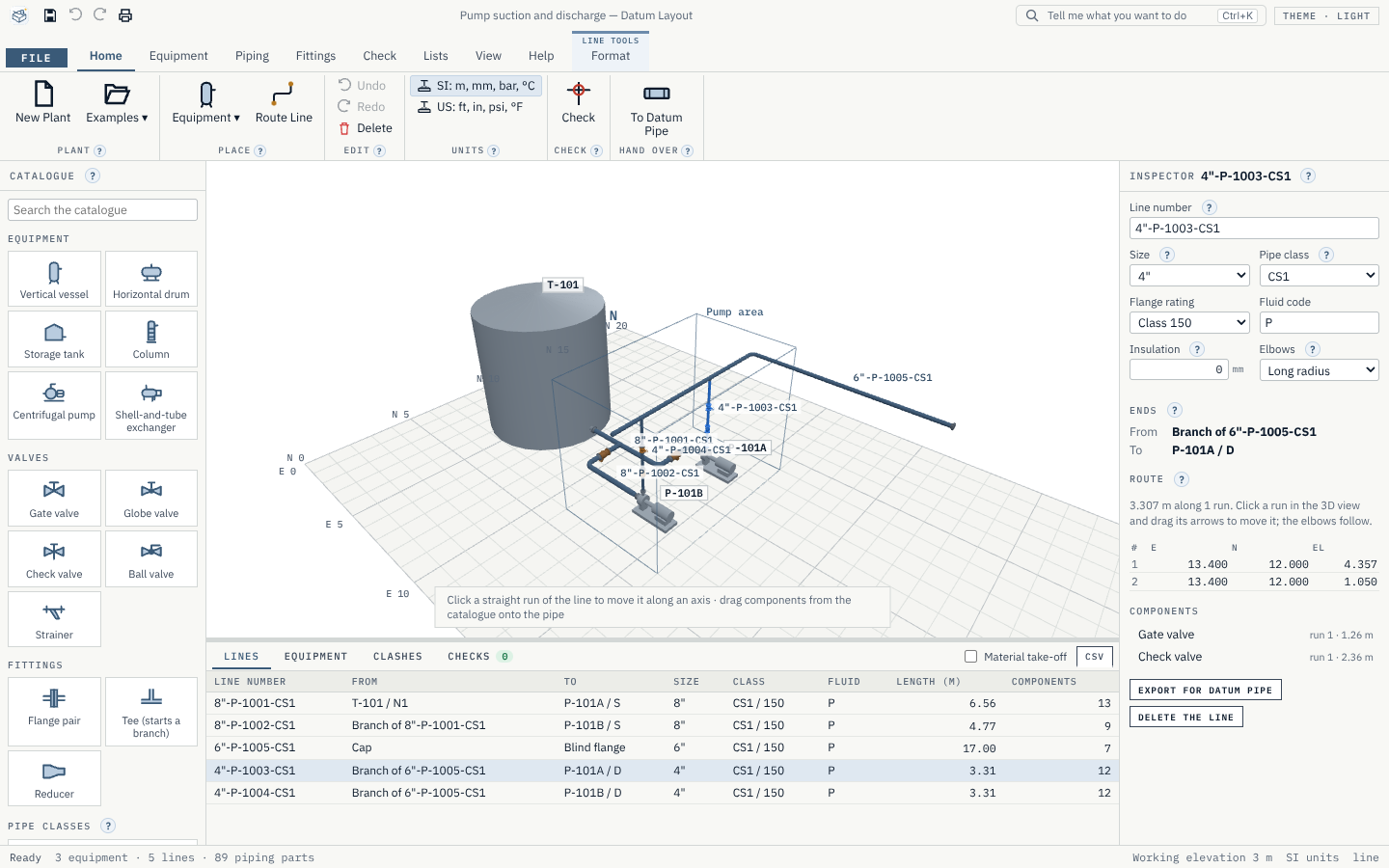
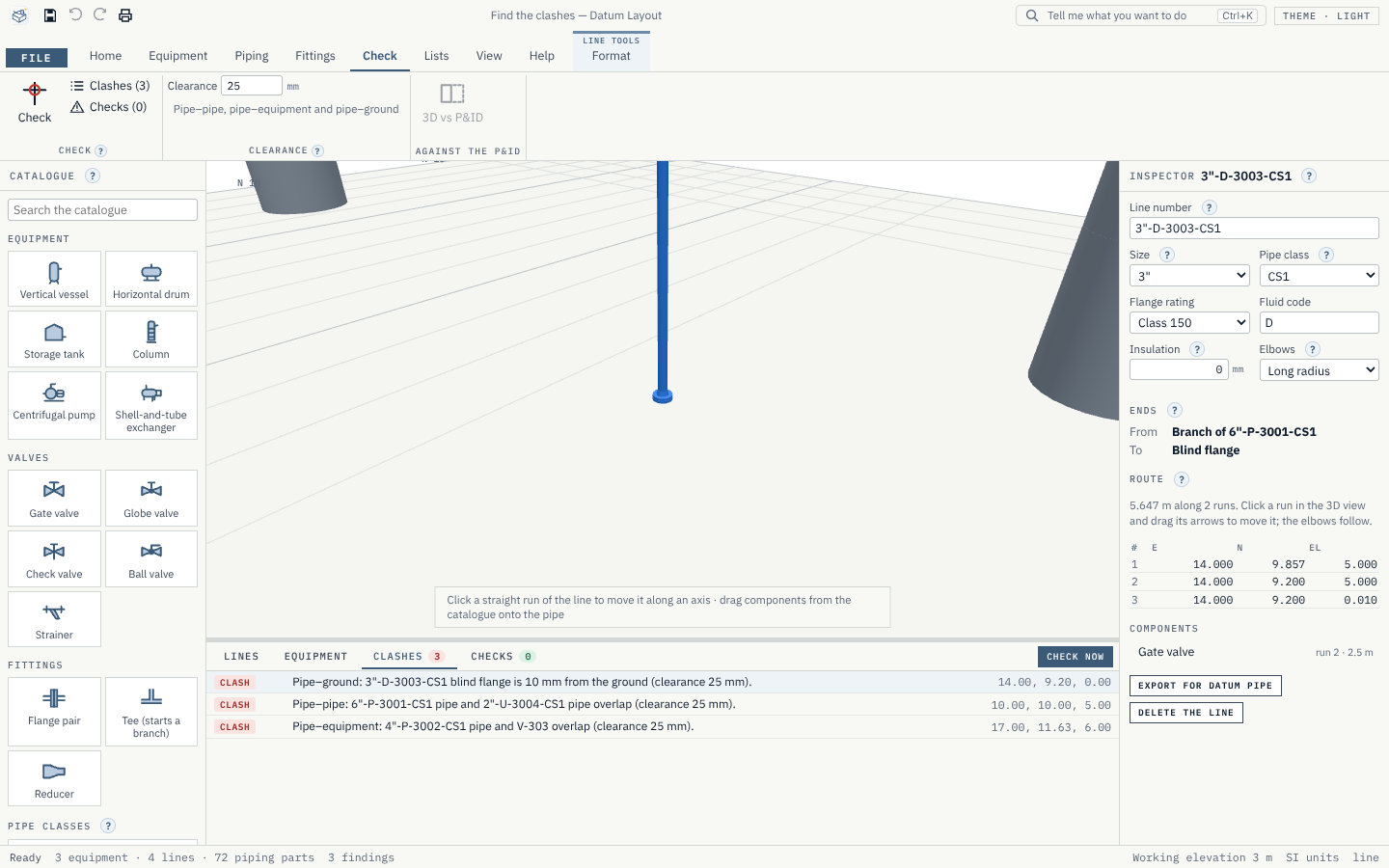
Examples. File › Examples opens the pump suction and discharge, the exchanger hook-up and the small pipe rack run with no clashes and no errors, and "Find the clashes" with exactly its three planted problems. Every line of every example is read and solved by Datum Pipe.
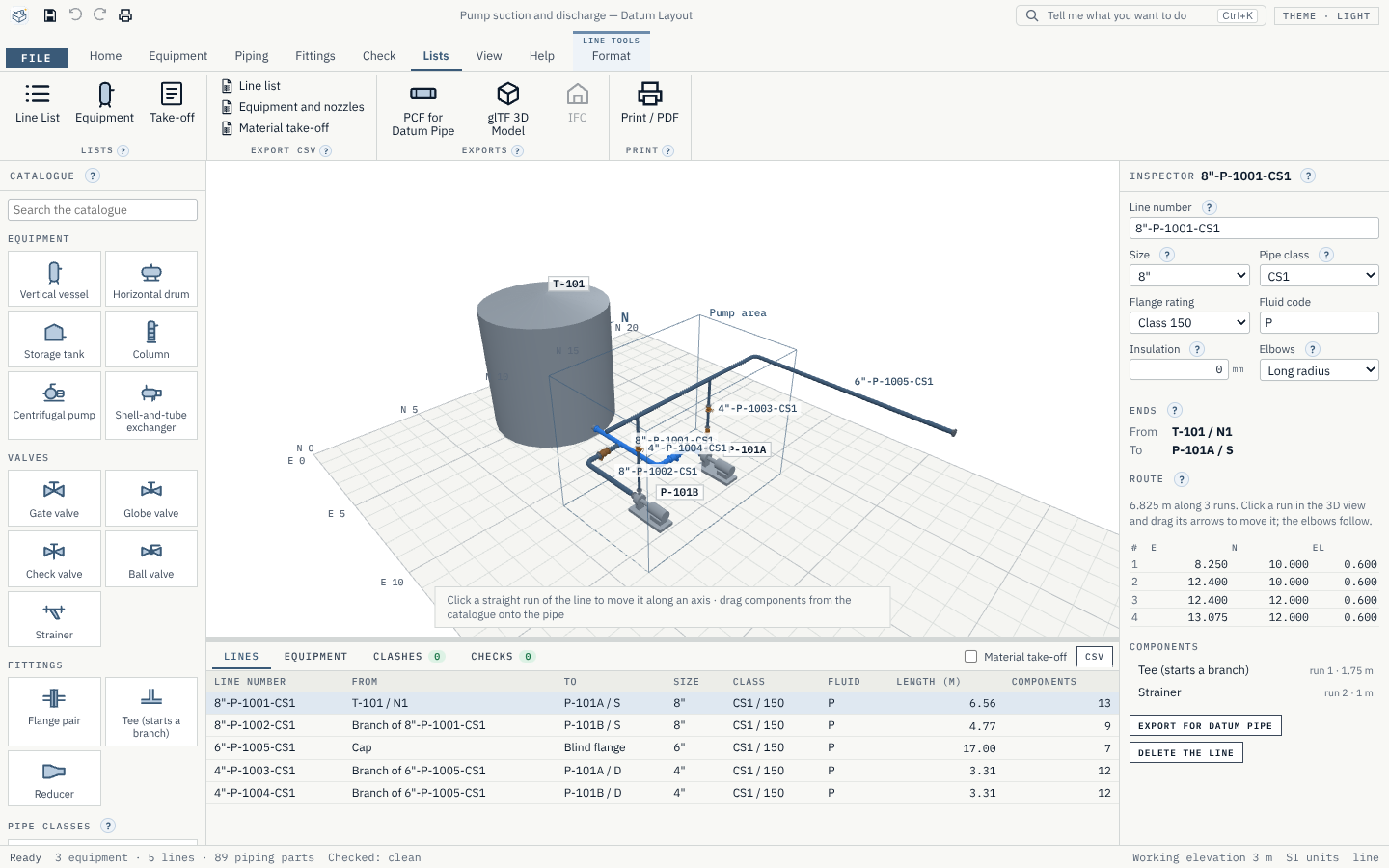
Print. File › Print (Ctrl+P) puts the 3D view as it is on screen on its own page with a title block, then the line list, the equipment list with nozzles and the material take-off, on any paper, with a header and footer; Save as PDF in the print window makes a PDF.
Help. Every ribbon group and panel has its ? card; Help › Getting Started walks through placing equipment, routing lines and handing over; the glossary explains the plant-design words; Help › Sources lists where every catalogue table comes from.
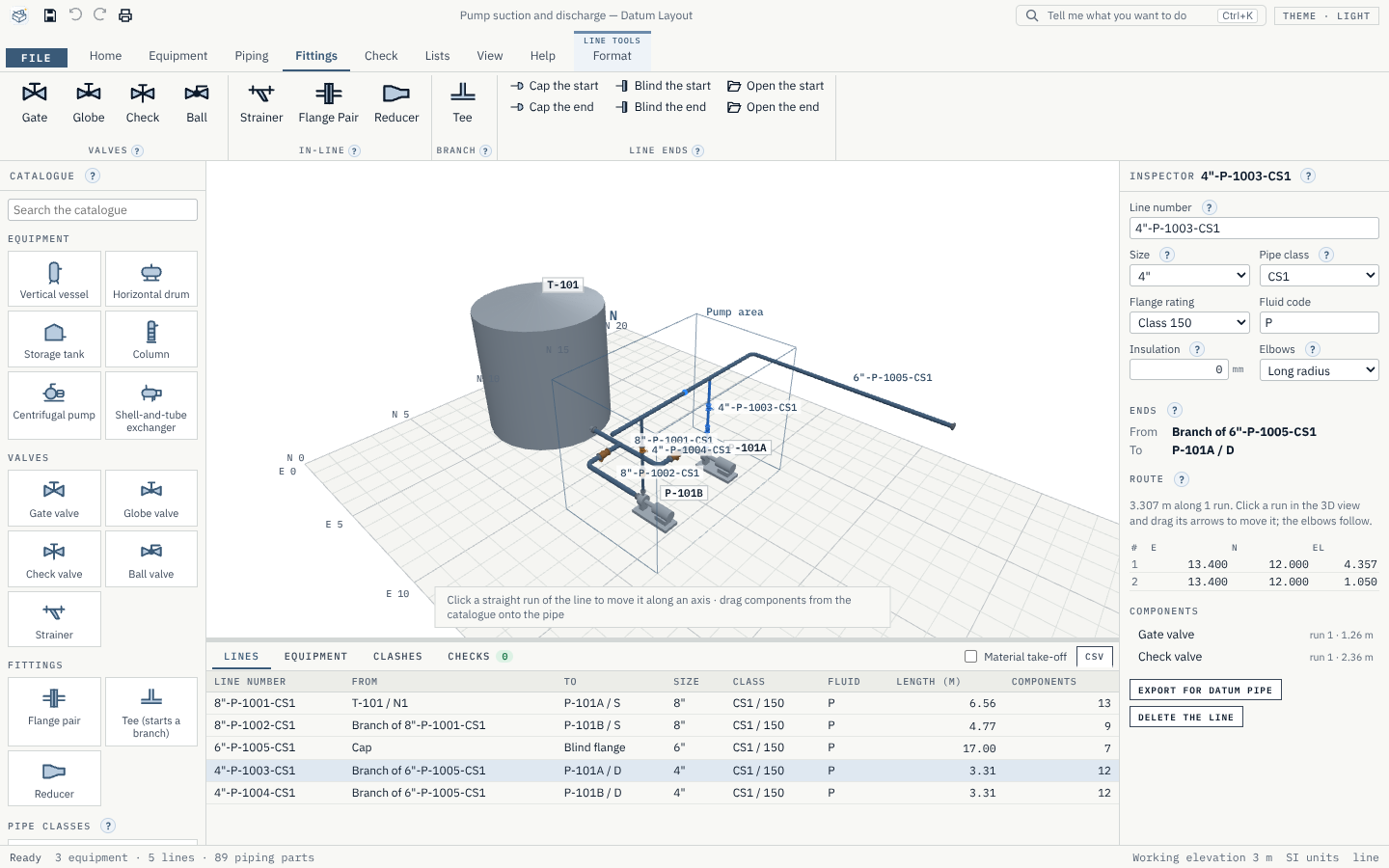
Pictures. New screenshots of the pump example, a valve being dropped onto the header, the clash list and the line list.
v0.1.3The hand-over to Datum Pipe, proved.
Datum Pipe reads every line. Every line of every example is exported as a piping component file and read by Datum Pipe's own engine, which then solves it: the same nodes, bends, tees, valves, flanges and reducers. The record is in docs/verification/0.1.3.md, and the check now runs on every change.
glTF checked. Every example's 3D model passes the Khronos glTF validator with no errors and no warnings.
Checks. Every check has a failing and a passing case in the tests. A component a class does not allow is now named properly ("a 16" ball valve is not allowed by class CS1").
Lists. The material take-off is tested against what example 1 holds: valves, tees, reducers, flanges, one gasket and one bolt set per flanged joint, and the pipe length of each line.
v0.1.2Dropping and moving fittings, and branches, made exact.
See where it snaps. While you drag a valve or fitting over a pipe, the marker shows exactly where it will land (the nearest free straight length between elbows, flanges and other components), or turns red and says why it cannot go there.
Slide a component along its run. Select a valve, strainer, tee or reducer and drag its amber arrow; it moves to the nearest free place, or onto another run of the line.
Branches. Dropping a tee starts routing its branch at once; double-click (or right-click) ends the branch at a free point, or click a nozzle. Fixed: a double-click did not end a route.
Resizing. A line's reducers keep the size after them when the line is resized, and a branch larger than its run is reported as a mismatch at the tee.
v0.1.1Lines now follow the equipment they connect to.
Move equipment, keep the lines. When you move a vessel, pump or exchanger, each line on its nozzles follows: the move passes along the line's runs, each run stretching along its own direction, so the route stays square and its corners stay where they can. A run too short for its fittings moves whole instead. Branches follow their tees, and components slide along their run when it gets shorter.
Route Again. Turning equipment, or a move no run can take, leaves a line skewed: it is reported ("route it again"), and Piping › Route Again (or the button in the Inspector) routes it square between its ends through its corners, keeping its components on their runs.
A new check. A line that no longer leaves its nozzle or tee square to it is reported, even when it has no turn.
v0.1.0The first release: lay out a plant in 3D, route its pipes, check them and hand each line to Datum Pipe.
The plot. A site grid with east and north coordinates, the plant north arrow, the ground and areas. Grid spacing, extent, north and ground are set in the Inspector.
Equipment from its datasheet. Six types: vertical vessel, horizontal drum, storage tank, column, centrifugal pump with motor and baseplate, and shell-and-tube exchanger. Drag one from the catalogue onto the plot, then set its tag, position, rotation, sizes, nozzles (size, rating, facing, position, direction) and datasheet lines. Drag its arrows to move it.
Routing. Piping › Route Line: click a nozzle, the corners and the other nozzle. Long-radius elbows appear at every turn (short radius by choice), a reducer where the nozzle and line sizes differ, and a weld-neck flange, gasket and bolt set at each flanged nozzle. Turns that are not 90° or 45°, and turns too tight for their elbow, are reported and not drawn.
Drag and drop fittings. Gate, globe, check and ball valves, strainers, flange pairs, tees and reducers snap onto the pipe, take the line's size and class, and split the pipe. A tee starts a branch. Change a line's size and every component re-sizes; move a straight run and the elbows follow; undo everything.
Checks. Clashes between pipes, pipes and equipment, and pipes and the ground, with a 25 mm clearance; open ends; size, rating and end mismatches; components the line's class does not allow; lines without a number. Click a finding to go to it.
Lists and exports. The line list, the equipment list with nozzles and the material take-off per line, each to CSV. A piping component file (.pcf) per line or for the whole plant that Datum Pipe reads; glTF 2.0 for any 3D viewer; print or save as PDF.
A catalogue of generated parts. Pipe ½" to 24", 90° and 45° elbows, equal and reducing tees, concentric reducers, caps, weld-neck and blind flanges in class 150 and 300, gaskets and bolt sets, and four valve types, each from a table whose rows name their source. One pipe class (carbon steel). Plug-in packs add your company's classes and parts.
Examples. A pump suction and discharge, an exchanger hook-up with a bypass, a small pipe rack run, and "Find the clashes" with three planted problems.
Get Datum Layout.
Free and open source (MIT). Installs in seconds for your user account, with no administrator rights, and updates itself from inside the app.
Is it safe? Every installer is built in public by GitHub Actions from its public source and published with its SHA-256 checksum; Datum Home checks it before it runs anything. The installers are not code-signed yet, so Windows may ask you to confirm, and a few virus scanners that judge a file by its shape can flag a new unsigned installer. Compare the checksum with the file you downloaded, or read the public scan report.
SHA-256 456e34fa…177f09Scan reportChecksums