
Datum Flow
Fluid flow simulation: draw it, set the flow, see and check the results.
For Mechanical, process, HVAC and energy engineers; researchers; students and lecturers.
What Datum Flow is
Datum Flow simulates fluid flow on the desktop. Draw a region or pick a template, choose the fluid, say where it comes in, where it leaves and where the walls are, and Datum Flow meshes it, solves it and shows the velocity, pressure and temperature.
It gives the numbers engineers need (pressure drop, flow rate, drag and lift, heat transfer) and proves its answers: every release ships a verification report that compares the solver with exact solutions and published benchmarks.
- Step 1
Draw the geometry
Rectangles, circles, polygons and arcs, added together or cut out as bodies in the flow. Or start from a template: channel, cavity, step, cylinder, heated box.
- Step 2
Set the flow
Choose water, air, a light oil or your own fluid. Mark the inlets, outlets, walls and symmetry lines, and set temperatures if heat matters. Datum Flow checks the setup and says what is missing.
- Step 3
See and check the results
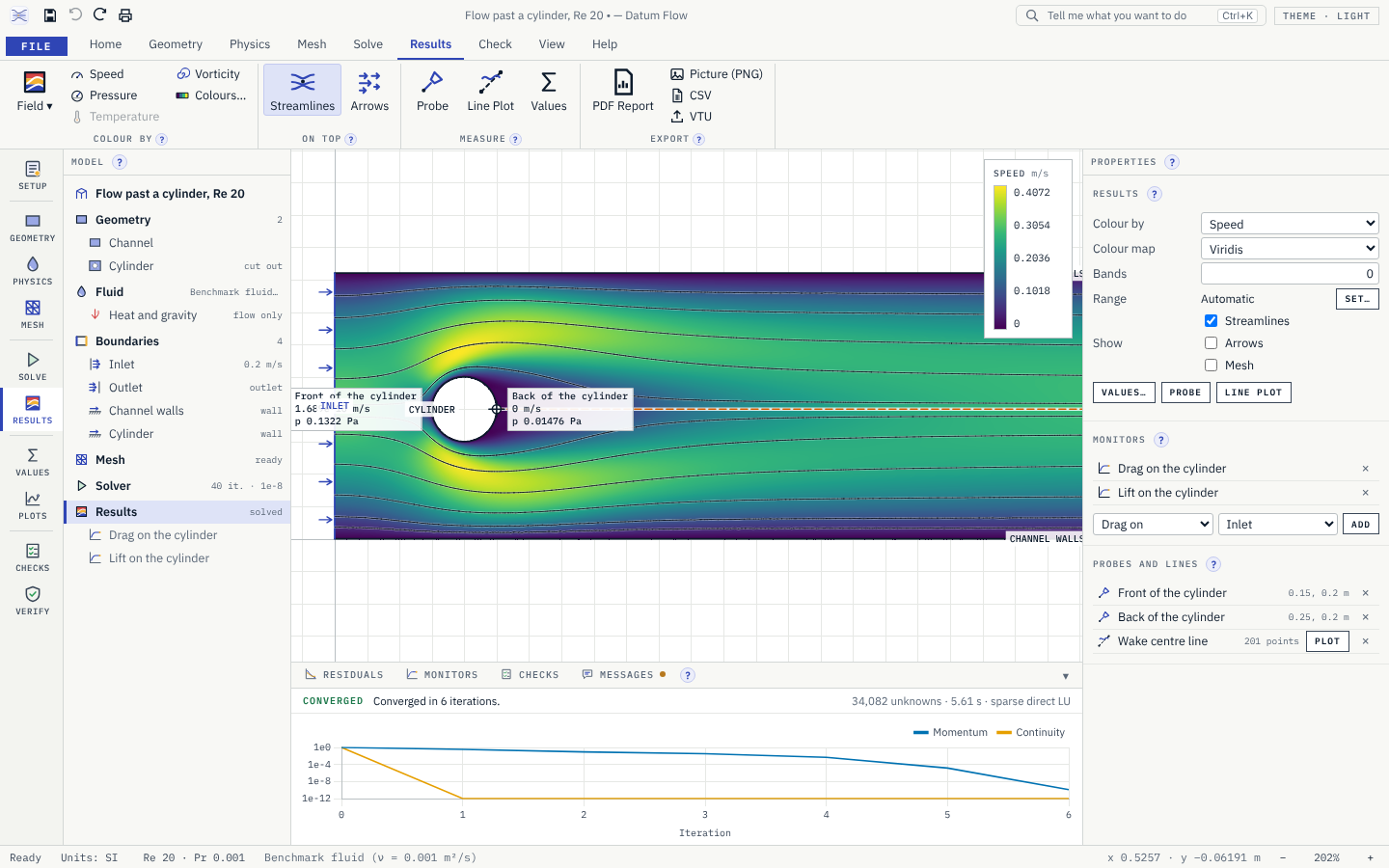
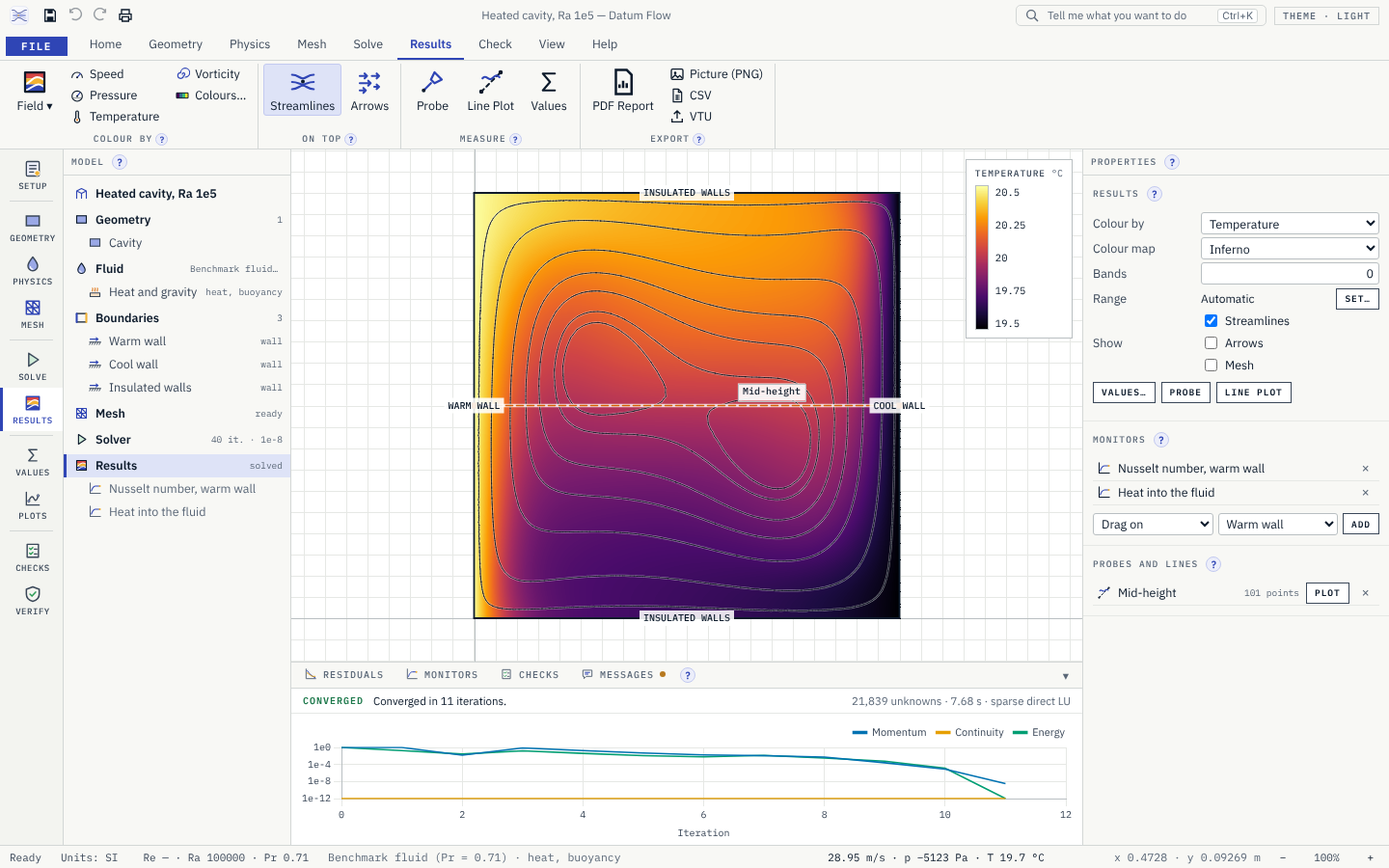
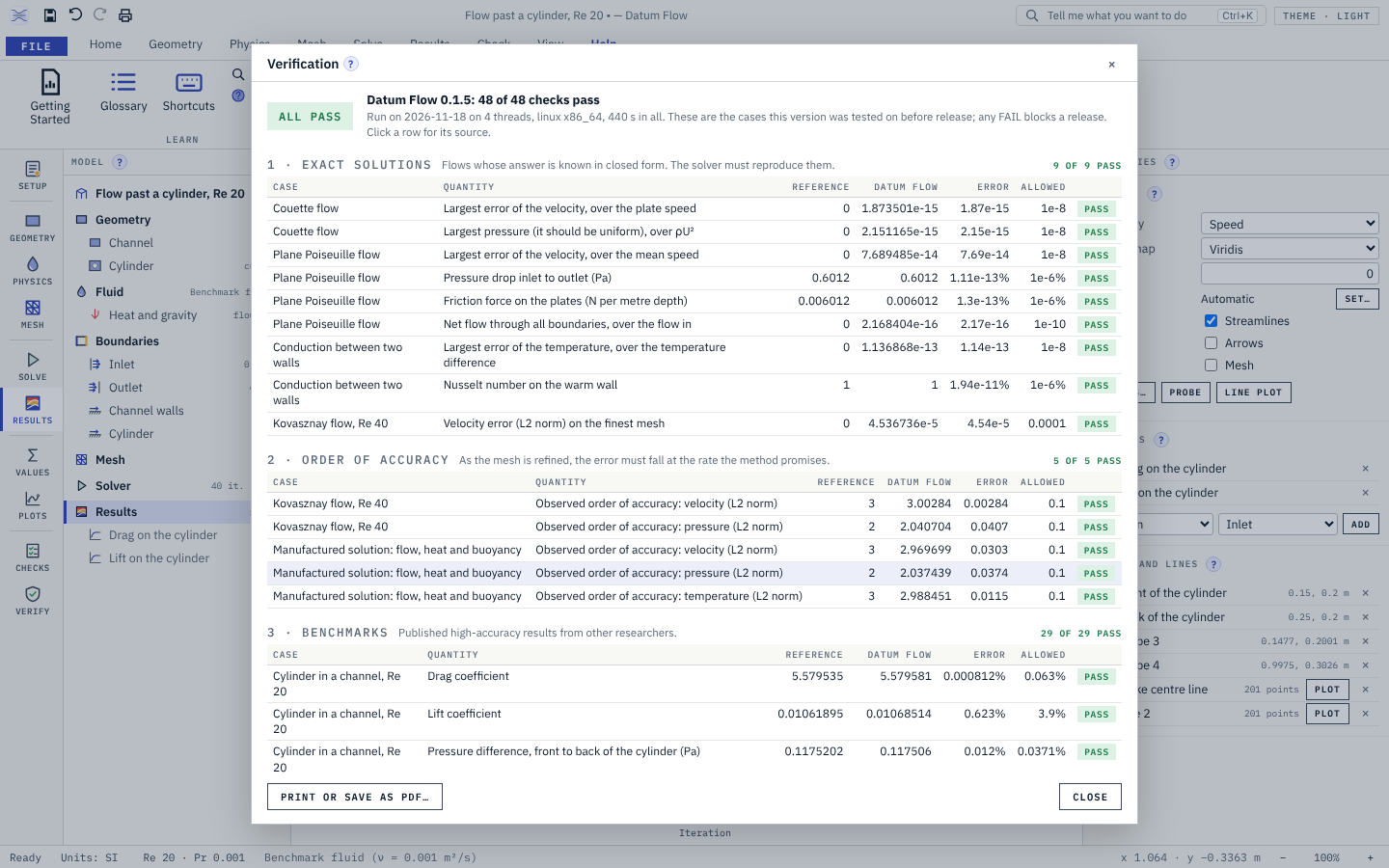
Contours, arrows and streamlines; probes and line plots; flow rate, pressure drop, forces and heat flow. Help › Verification shows how the solver compares with known answers.
What it does
- A
The Datum window: ribbon, sidebar of views, a step-by-step Setup, printing and an updater
- B
2D steady laminar flow, with heat and natural convection
- C
Its own finite-element solver, written in Rust, inside the app
- D
Automatic meshing with refinement at walls, corners and wakes, and a mesh quality report
- E
A setup check that refuses to solve and says why: no outlet, an edge with no boundary, a flow that is probably turbulent
- F
Contours, arrows and streamlines; probes and line plots; flow rate, pressure drop, drag and lift, heat flow and Nusselt number
- G
Models open solved: the mesh and results are kept in the file, exactly
- H
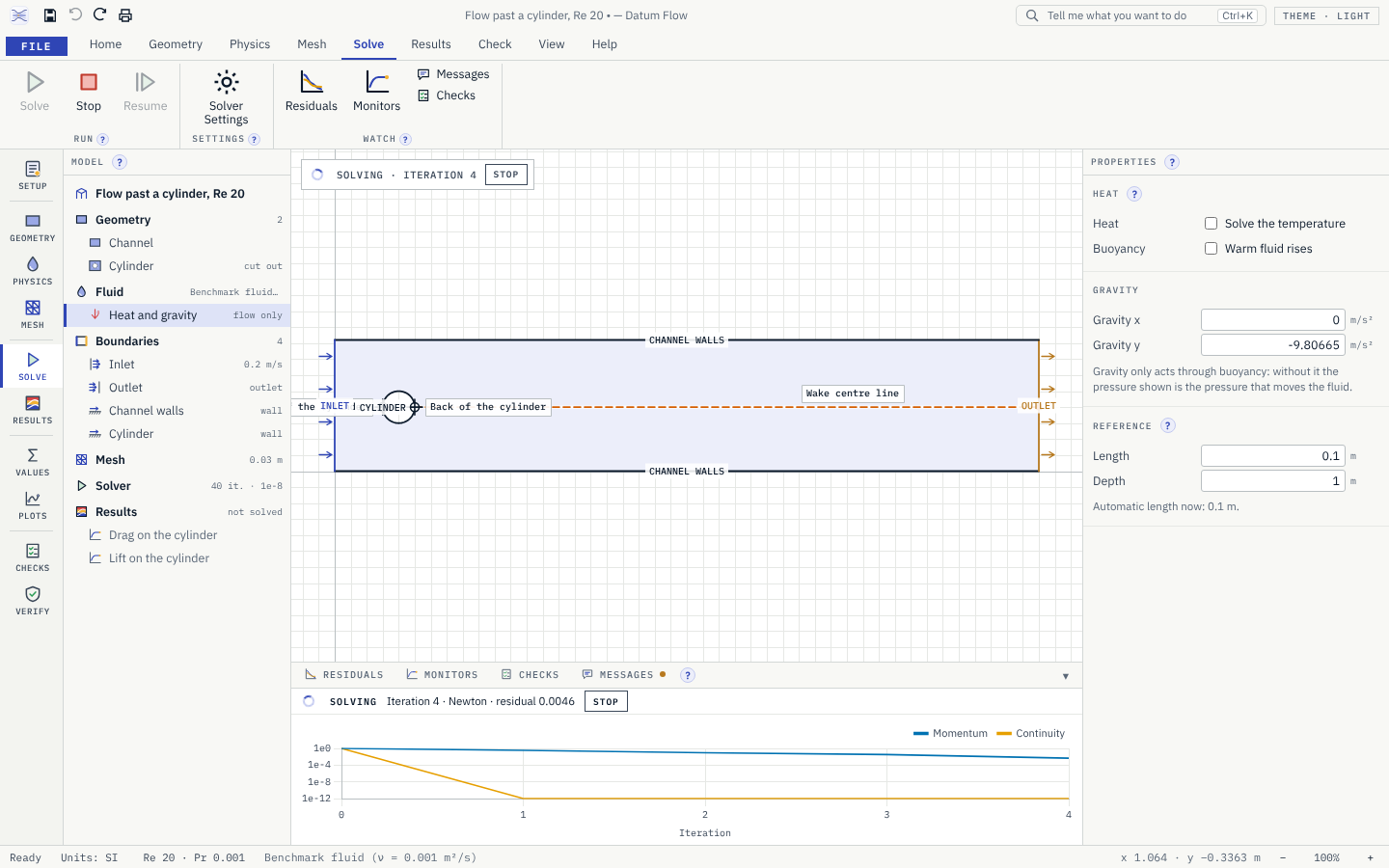
Residuals and monitors plotted while it solves; stop and resume; plain advice when it does not converge
- I
PDF report, VTU for free viewers, CSV, PNG; DXF outlines in; a command-line tool
- J
A verification report in every release: exact solutions, order of accuracy, published benchmarks
Screens
Roadmap
- Nextv0.1.6
Guide and tutorial
- Help › Guide: a printable user guide with pictures of the real window
- Help › Tutorial: one example that uses every view, with a note on each
- The cylinder benchmark's reference values checked against its original paper
- Soonv0.2.0
Time-dependent flow
- Time stepping, with the step size chosen for accuracy
- Verified against flows that start from rest and have an exact answer
- Soonv0.2.1
Vortex shedding
- The cylinder in a channel at Re 100: the benchmark's largest drag and lift and its Strouhal number in the verification report
- Soonv0.2.2
Faster flows
- Stabilisation for flows where convection dominates, so coarser meshes stay smooth
- Soonv0.2.3
Animations
- Play the flow through time; monitors plotted over time
- Save frames as pictures
- Soonv0.2.4
Transient heat
- Heating and cooling over time, with natural convection
- Laterv0.3.0
Boundary layers
- Thin layers of elements along walls, with a wall-distance helper
- Laterv0.3.1
Pipes and nozzles
- Axisymmetric flow, verified against the exact flow in a round pipe
- Laterv0.3.2
Heat through solids
- Solid parts beside the fluid, heat passing through both
- Laterv0.3.3
Heat-sink cases
- Fins with their own conduction, and their benchmarks
- Laterv0.4.0
Iterative solvers
- Iterative linear solvers with preconditioners, for models too big for the direct one
- Laterv0.4.1
Bigger models
- Assembly on every core; meshes of a million unknowns
- Laterv0.4.2
Parameter sweeps
- Run one model over a range of speeds, temperatures or sizes, with a table of the results
- Laterv0.5.0
The 3D decision
- 3D finite elements or finite volumes, chosen with measurements and written up
- Laterv0.5.1
3D meshing
- Tetrahedral meshes of 3D regions
- Laterv0.5.2
First 3D cases
- 3D cavity and 3D cylinder benchmarks
- Laterv0.6.0
External solver: SU2
- Write SU2 cases, run SU2 as a separate program you install, read the results back
- Laterv0.6.1
External solver: OpenFOAM
- The same for OpenFOAM
- Laterv0.7.0
Turbulence: one equation
- Wall distance and the Spalart–Allmaras model, verified on published cases
- Laterv0.7.1
Turbulence: two equations
- The k-ω SST model, verified on published cases
- Laterv0.7.2
Turbulence checks
- Flat plate, bump and step cases in the verification report
- Laterv0.8.0
STEP import
- 3D and 2D outlines from STEP files
- Laterv0.8.1
Family links in
- Geometry from Datum Layout; line data from Datum Schema
- Laterv0.8.2
Family links out
- Pressures and temperatures into Datum Mesh
- Laterv0.9.0
Teaching pack
- Guided lessons on the classic cases, each with its theory and reference data
- Laterv0.9.1
What went wrong
- A mode that shows the common mistakes in a setup and what they do to the answer
- Goalv1.0.0
Version 1
- Full verification and validation report, user guide, signed installer
Releases
v0.1.5Arcs and rounded corners, smoother colours, readable streamlines, and reports whose tables flow over pages.
- Arc Side. Geometry › Arc Side: click a side of a polygon or rectangle, then click where the arc should pass. A point on the side's line makes it straight again.
- Round Corner. Geometry › Round Corner: click a corner and type the radius. The arc meets both sides smoothly; where the two sides share a boundary the arc joins it, and otherwise the setup check asks you to give it one.
- Outlines checked with their arcs. An arc that would cross another side is refused at once, with the reason, instead of failing later in the mesher.
- Smoother colours. Contours now follow each element's curved (quadratic) values instead of four flat pieces per element.
- Readable streamlines. Streamlines that would crowd closer than a few pixels are left out, so in a long thin region seen whole (the heat sink) they no longer hide the colours. Zoom in and they come back.
- Reports that flow. The PDF report and the printed verification record lay themselves out on the paper chosen: tables split between rows, carry their header onto the next page, say "(continued)", and nothing is cut off. A larger paper or smaller margins give fewer pages.
- Shallow arcs are drawn smoothly in the view.
v0.1.4Models open solved, and the colours of results can be fixed by hand.
- Results kept with the model. Saving keeps the mesh and the solution in the .dflow file, so a model opens solved: contours, streamlines, probes, values, the residual and monitor history, all without solving again. Solving again starts from the kept answer, so it takes one step. The numbers are stored exactly; a model of 25 000 unknowns makes a file of about 1 MB.
- Only results that still fit. If a file's model was changed outside Datum Flow, its results are left out, and Messages says why. The results never belong to another model.
- Your choice. File › Options › "Keep results in the file" turns it off for small files.
- Colour range by hand. Click the legend, or Results › Range in the properties: set the low and high values the colours run between, for each field. The range is kept with the model, so several models or meshes can be compared in the same colours. Values beyond it take the end colours, and the legend marks them with ≥ and ≤. Automatic sets it back.
- Command line.
flow-cli solve model.dflow --save solved.dflowwrites the model with its results, to open solved in the window. Solving a file that keeps results starts from them.
v0.1.3The verification report now checks its reference values against the original papers, and the backward-facing step is compared with the experiment.
- Reference values from the papers. The lid-driven cavity's values were checked against Botella & Peyret (1998), Tables 6, 9 and 10, and the heated cavity's against de Vahl Davis (1983), Table V. Every row says which table its number comes from.
- Tighter bands for the heated cavity. de Vahl Davis gives the error of his own solution: 0.1%, 0.2%, 0.3% and 1% at Rayleigh numbers 10³ to 10⁶ (his Table VII). Datum Flow's Nusselt numbers are compared within those, instead of a flat 1%.
- New checks. The largest horizontal and vertical velocities on the cavity's mid-planes at each Rayleigh number, also from de Vahl Davis's Table V.
- Validation against an experiment. The backward-facing step is compared with the reattachment lengths measured by Armaly et al. (1983) at Reynolds numbers 100, 150, 300 and 389 (read off their Figure 14). The paper gives no uncertainty for these lengths, so the report says plainly that the 10% band used is a judgement.
- Fixed: on fine meshes, the step's reattachment length could be read at a small corner eddy at the foot of the step instead of where the main eddy ends.
- 48 of 48 checks pass. Still from secondary sources: the cylinder benchmark (the pages of the paper with its definitions and results have not been checked) and Kovasznay's exact solution.
v0.1.2The Datum sidebar: every view one click away, and a step-by-step Setup for new models.
- Sidebar. As in every Datum app: one icon and label per view, Setup first, then Geometry, Physics and Mesh, then Solve and Results, then the pages of numbers: Values, Plots, Checks and Verify. The five views of the model show the 2D view with their ribbon tab; choosing a ribbon tab lights its view in the sidebar. The model tree stays beside it.
- Setup. A step-by-step panel on the right: name and units, geometry (or a template), fluid, heat, boundaries, mesh, then check and solve. Each step says what it is for and ticks itself when it is done. It opens by itself for a new blank model; reopen it from Setup in the sidebar. Picking a shape, an edge or a boundary shows its properties, with a button back to the steps.
- Values page. The values table on a full page: monitors, flow through each inlet and outlet, pressure drops, forces, heat flows, Nusselt numbers, the mass and heat balances and the extremes. Copy it as a table.
- Plots page. The probes in one table, and a chart for every line drawn across the flow, each with the quantity to plot and its CSV.
- Checks page. What kind of flow this is (Reynolds, Rayleigh and Prandtl numbers, with the speed and length they come from) and the full setup check. The sidebar shows a count of what needs attention, in red when something stops the solve.
- Verify page. The verification record of this version on a full page, as in Help › Verification.
- Roadmap. File › Roadmap lists the next releases one by one, each a small three-number version, up to 1.0.0.
v0.1.1Mesh, solve and see the results: Datum Flow now simulates 2D steady laminar flow with heat and natural convection, and proves its answers.
- Mesh. Mesh › Generate makes the mesh, finer at walls, at corners that stick into the flow and in the wake of bodies, with a size slider and local sizes. The quality report gives the element count, smallest angle and size ratio, and colours the elements on the view.
- Check before solving. The Checks tab lists what is missing and how to fix it. Solving is refused, with the reason, when there is no outlet, an edge has no boundary, temperatures are set with heat off, or the flow is probably turbulent ("Re ≈ 12000: this flow is probably turbulent; 0.1 solves laminar flow only.").
- Solve. Steady laminar flow, with heat and buoyancy when turned on. Residuals and monitors (drag, pressure drop, outlet temperature and more) are plotted while it runs. Stop at any time and resume. When a solve does not converge, Datum Flow says what to try, and raises the Reynolds or Rayleigh number in steps by itself when a direct solve fails.
- Results. Contours of speed, pressure, temperature, vorticity and velocity; streamlines and arrows; colour maps that read well in print (viridis, inferno, cividis, and a blue-white-red map for signed values). Click to place probes, draw a line to plot along it, and read the values table: flow rate through each inlet and outlet, pressure drop, force on each wall, heat flow, Nusselt number, and the mass and heat balances.
- Examples. File › Examples: lid-driven cavity (Re 100 and 1000), channel flow, flow past a cylinder (Re 20), backward-facing step, heated cavity (Ra 10³ to 10⁶) and a heat-sink fin channel. Each solves in seconds.
- Verification. Help › Verification shows the record of this version: exact solutions reproduced to round-off, errors falling at the method's formal rate, and published benchmarks (cylinder in a channel, lid-driven cavity, heated cavity). 36 of 36 checks pass; the same record is in
docs/VERIFICATION.md, with what is not verified said plainly. - Exports. A PDF report (inputs, mesh, convergence, results, verification status), VTU for free viewers such as ParaView, CSV of probes and line plots, PNG of the view.
- Import DXF. Closed outlines of lines, arcs, circles and polylines become the flow region and the bodies in it.
- Command line.
flow-cli solve model.dflowmeshes, checks and solves a model without the window, and writes VTU and CSV files. - Results are kept while the model is open and are not saved in the file: solve again after opening.
Get Datum Flow.
Free and open source (MIT). Installs in seconds for your user account, with no administrator rights, and updates itself from inside the app.
Is it safe? Every installer is built in public by GitHub Actions from its public source and published with its SHA-256 checksum; Datum Home checks it before it runs anything. The installers are not code-signed yet, so Windows may ask you to confirm, and a few virus scanners that judge a file by its shape can flag a new unsigned installer. Compare the checksum with the file you downloaded, or read the public scan report.
SHA-256 81c8a11b…439ecfScan reportChecksums